


DataWeave: New way to process CSVs in Salesforce
Are you looking for an easy way to import CSV files into Salesforce without having to write complex code? This new tool…
Key Points
- Most revenue leakage isn't visible on a dashboard. It's hidden in price discounts, out-of-control automation, and manual reconciliation.
- A targeted diagnosis can determine in minutes what an internal audit often takes weeks to determine.
- A free check is a good start, but most people stop at the configuration and don't get to the revenue stream itself.
- The right approach depends on the complexity: a light review for a simple environment, and more in-depth engineering for a layered one.
- Ask for a report that outlines priorities, not a general checklist.
Brief Assessment
For most teams, a targeted assessment like Revenue at Risk is the quickest way to get started: it’s free, takes about ten minutes, and doesn’t require access to your systems. Save a full discovery for organizations with years of accumulated complexity.
Are you looking for an easy way to import CSV files into Salesforce without having to write complex code? This new tool from Salesforce offers a solution available since 2021 that allows you to convert CSVs to formats such as JSON.
Why is DataWeave so useful?
- It prevents you from having to write more complex code each time to import CSV files. By default, it already has functionality to read and folder CSV data.
- It is faster and easier to implement. For example, you can call DataWeave from, say, a Flow.
- You save development capacity because you don't have to program as much.
How does DataWeave work?
DataWeave is a standard part of Salesforce, so you don't need to purchase it separately. It is built into most Salesforce licenses, check carefully in advance which edition your organization uses.
To set up DataWeave, there are a few simple steps:
- Ask a Salesforce developer to create a DataWeave script. This contains the instructions for converting the CSV data to JSON, for example. The developer can deliver this script within a few hours.
- The developer then creates a small Apex class in Salesforce that calls the DataWeave script. This is an adapter of sorts. Again, this takes a few hours at most.
- Finally, the developer links the script to an existing process or Flow. For example, to your monthly data import flow. Thus, it automatically calls the DataWeave script as soon as a new CSV file arrives.
And that's it! Your CSV data is now effortlessly converted to a usable format by DataWeave. So all it takes is a few hours of work from a Salesforce developer to do the setup. Then, you can continue to import all CSV files without further modifications.
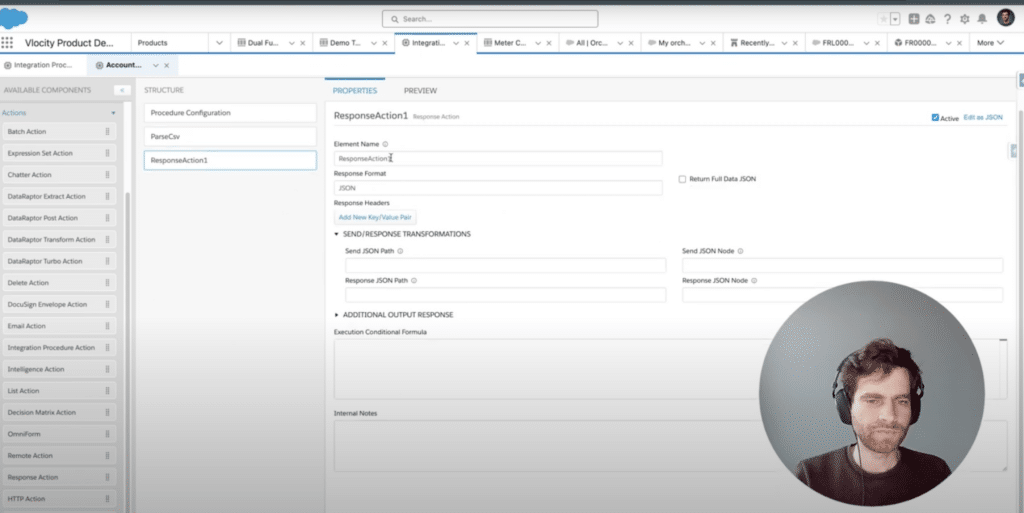 Salesforce Engineer Theodore prepares files for deployment in DataWeave
Conclusion
This tool makes importing CSV files very easy. With built-in support for CSV and powerful transformation options, it is the solution to quickly and simply integrate data without cumbersome code.
Key benefits at a glance:
- No more complex code required thanks to built-in CSV and mapping functions
- Save on development capacity and resources
- Effortlessly convert large amounts of CSV data to usable formats
- Suitable for both one-time imports and recurring bulk imports
Curious about the possibilities? Feel free to contact us to see what this tool can do for your organization.

Yannick van Eldik
CaseNine Yannick van Eldik is a co-founder of CaseNine and helps organizations increase their revenue by optimizing commercial processes.
Share this article
Read more
Related insights

Technical Deepdive Series
Scalable Salesforce integrations for steady growth
This article explains why Salesforce integrations become unstable over time and how you can design scalable, reliable architecture using a diagnostic, targeted approach.
April 11, 2026 · 3-minute read
Read more
Technical Deepdive Series
Seamless Salesforce Integration: A Practical Guide to Sustainable Growth
This article explains why Salesforce integrations become unstable over time and how you can restore predictable behavior through clear architectural choices, data ownership, and error handling.
April 10, 2026 · 4-minute read
Read more
Technical Deepdive Series
AI-powered testing in Salesforce sales processes
This article demonstrates how AI-powered testing improves stability in complex Salesforce revenue processes through better diagnostics, regression testing, and robust governance.
April 9, 2026 · 3-minute read
Read moreFind the leak before it finds your margin
Revenue at Risk is free, takes about ten minutes, and doesn't require access to your systems. You'll receive a clear report with priorities, reviewed by an engineer—never by a chatbot.